

Turn on DynoWeb tracking in under a minute
Installing DynoWeb does not start the recording. Shopify only lets you switch an app on inside your own theme, so there is one toggle left to flip. Here is exactly where it is.
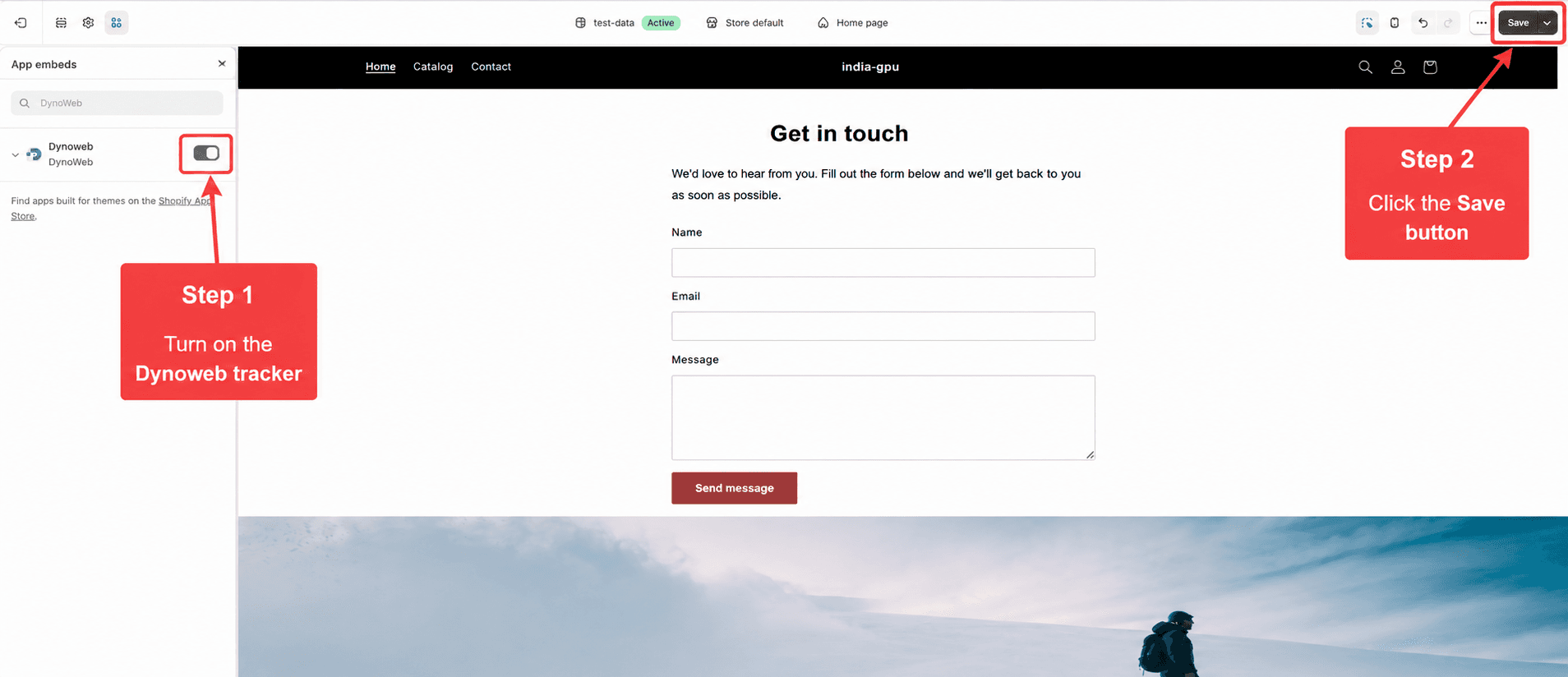
Both things you need to touch: the DynoWeb toggle on the left, and Save on the top right.
Four steps, no code
Open your theme editor
In your Shopify admin, go to Online Store → Themes, then click Customize on your live theme. Do this on a computer — Shopify's theme editor does not open on a phone.
Open App embeds
In the left sidebar of the editor, click the puzzle-piece icon. That panel lists every app allowed to run on your storefront.
Switch DynoWeb on
Find DynoWeb in the list and click its toggle so it turns dark. If it already looks on, leave it alone — you still need step 4.
Press Save, top right
This is the step that gets missed. A toggle that is not saved changes nothing: your theme keeps serving the old version, and DynoWeb keeps recording nothing.
What happens next
- When does data start appearing?
- With your next visitor. Earlier visits cannot be recovered, so the first numbers build up as people arrive rather than appearing all at once. Most stores have readable heatmaps after a day of normal traffic.
- The toggle looked on already — do I still press Save?
- Yes. The editor shows unsaved state the same way it shows saved state. If you are not sure, toggle it off and on again, then Save.
- Will it slow my storefront down?
- Collection is designed to stay off the critical path. If load time is a concern, Storefront Speed will show you which assets are actually costing you.
- Do I have to redo this when I change themes?
- Yes — app embeds are per-theme. If you publish a new theme, switch DynoWeb on in that one too, the same four steps.
Send us your store URL and we will look
Some themes name the panel slightly differently, and a few hide it behind a scroll. Tell us your store address and what you see instead, and we will point at the exact spot — or check from our side whether the embed is already live.
Not installed yet? Get DynoWeb on the Shopify App Store.