

Session Replay
Reconstructed visitor sessions with frustration markers on the timeline, so you can jump to the moment something went wrong instead of watching from the top.
Numbers tell you a page underperformed. A replay tells you a shopper tapped the variant picker four times, scrolled up to re-read the shipping line, scrolled back down, and closed the tab. The second one is what changes a decision.
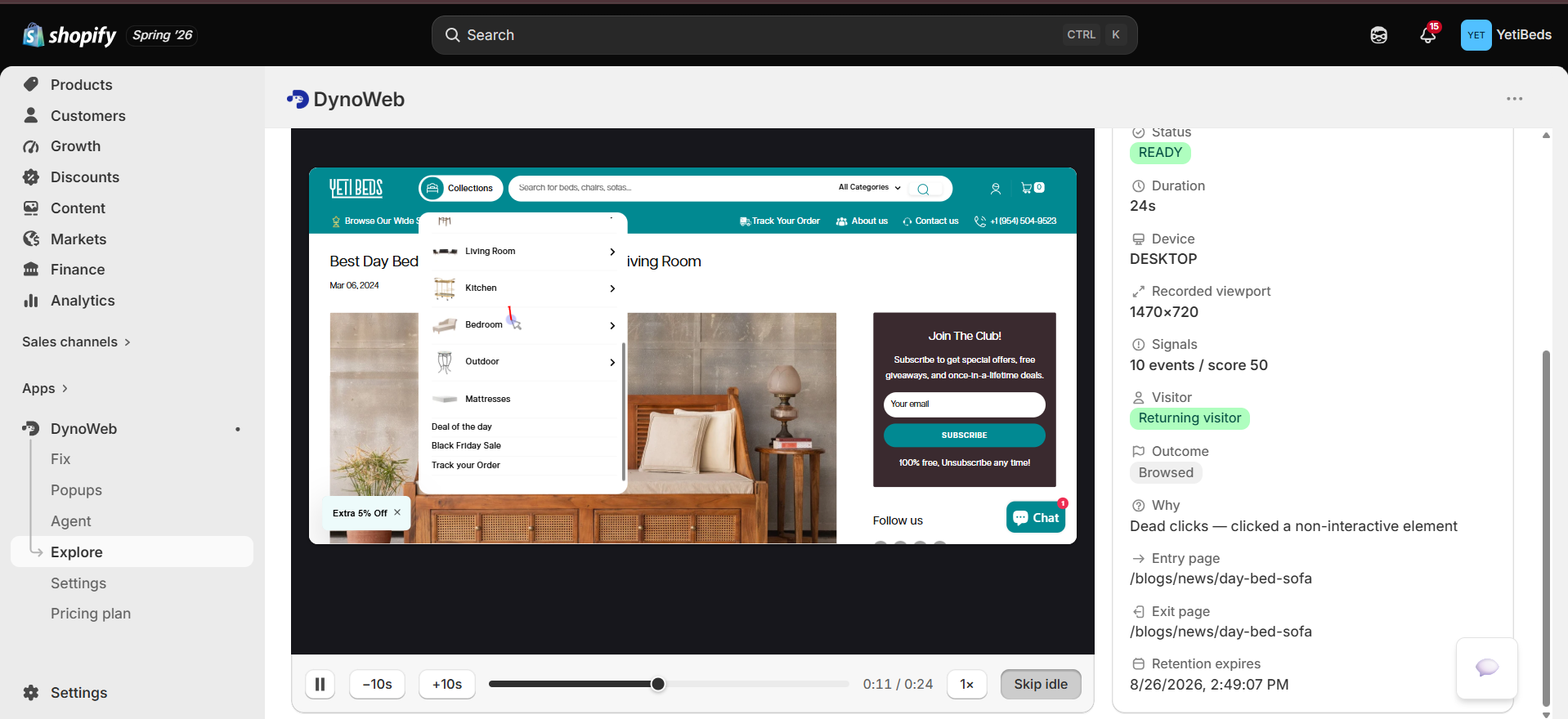
DynoWeb records nothing resembling video. The tracker captures a compact stream of DOM mutations and interaction events, and the player reconstructs the page from that stream — which is why recording is cheap enough to leave on and why replays load quickly.
What you see
- The page as the visitor saw it — reconstructed markup and styles, not a screenshot slideshow
- Cursor movement and clicks, including the ones that did nothing
- Scroll behaviour — where they moved fast, where they stopped
- Form interaction — which fields were entered, which were skipped, where they abandoned. No field values are captured
- Navigation across pages within the session, as one continuous replay
- Frustration markers on the timeline — rage clicks, dead clicks and error clicks are pinned so you can skip straight to them
The markers are the feature. Watching a four-minute session from the start is a tax nobody pays twice; jumping to the three rage clicks at 01:12 is a habit.
Recording controls
Settings → Replays. These exist so recording volume stays proportional to what you will actually watch.
| Control | Effect | Why you'd use it |
|---|---|---|
| Enable replays | Master switch | Off entirely if you only want aggregate data |
| Frustrated sessions only | Records a session only if it produced frustration signals | Every replay in the list is one where something went wrong — highest insight per minute watched |
| Duration limits | Minimum and maximum session length | Skips one-second bounces and pathological forty-minute idle tabs |
| Daily recording cap | Ceiling on sessions recorded per day | Keeps a traffic spike from consuming the day's recording in an hour |
| Retention | How long recordings are kept | Bounded by your plan; see below |
Frustrated-sessions-only is the setting most stores should use
On a store doing thousands of sessions a month, the unfiltered replay list is mostly people who bought without difficulty or left in four seconds. Filtering to frustration turns the list into a queue of problems.
Retention is what plans buy
Recording and watching replays are available on every plan, including Free. What a higher plan buys is history:
| Plan | Retention |
|---|---|
| Free | 30 days |
| Growth | 90 days |
| Pro | 180 days |
| Custom | 365 days |
Recordings past your window are cleaned up automatically. Recent history is never quietly removed to create upgrade pressure — the retention window is the whole mechanic.
Long retention is not a vanity number. It is what lets you answer "was this already broken before the March theme update?", which is the question that usually settles an argument about what to roll back.
Getting to a replay
Four entry points, because the useful replay is almost never the one at the top of a chronological list:
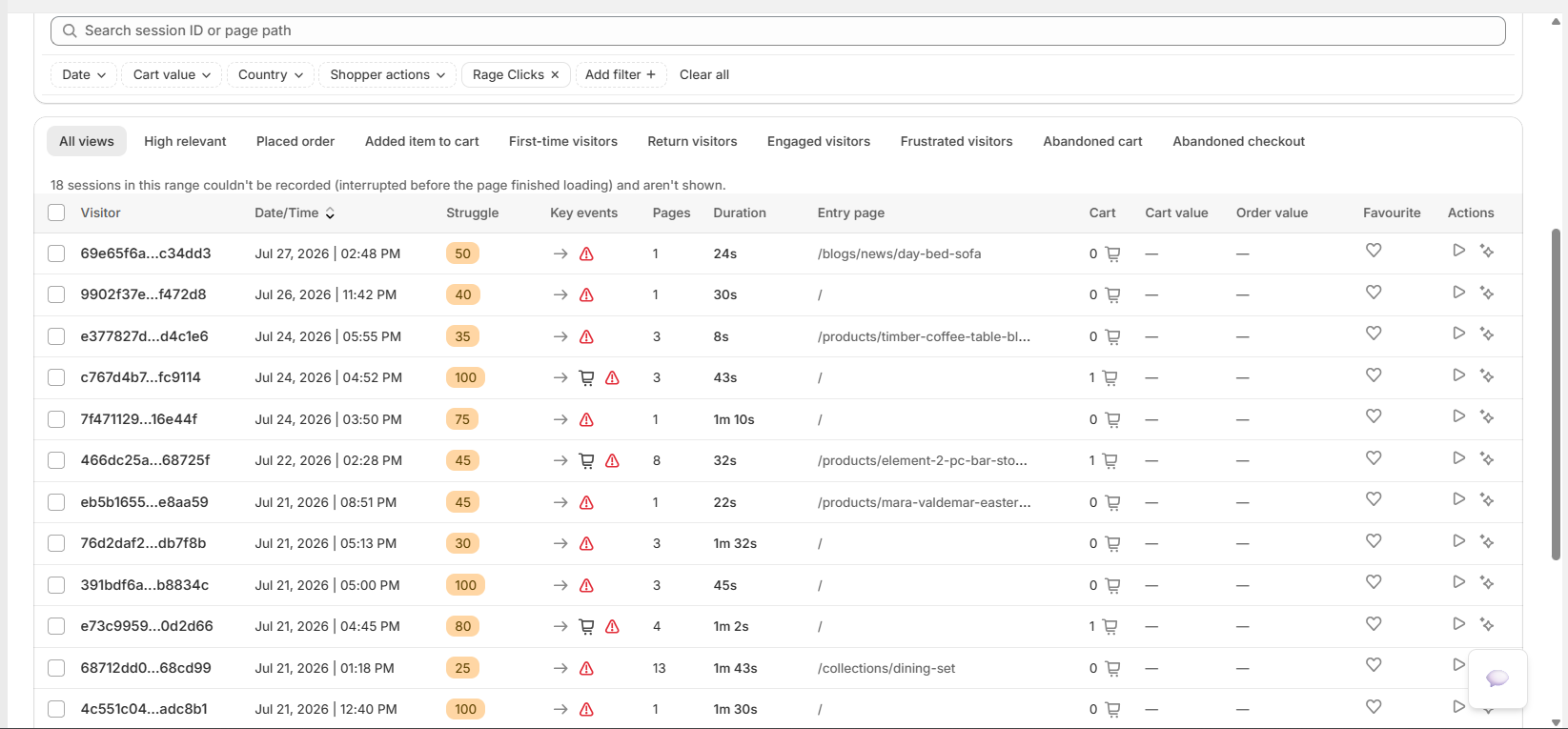
Replays index
The full list, filtered by date, device, country, frustration level or revenue.
From a heatmap
Drill from a frustration hotspot into the sessions that produced it.
From Page Explorer
Start at the page with the bad metric, then watch sessions on that page.
From Event Explorer
Start at the signal type — 'show me dead clicks' — and land on the session where it happened.
The replays index itself follows Shopify's native index pattern: filters, tabs, sort, bulk actions and pagination, so it behaves like every other list surface in the Shopify admin rather than a bespoke table.
The investigation flow
Replay is step four of a funnel that starts wide:
- Dashboard — rage clicks are up 40% week over week
- Page Explorer — 320 of them are on the product page, 50 on the homepage
- Event Explorer — on the product page they concentrate on one selector
- Session Replay — and here is a shopper tapping that selector six times, shaking the cursor, and leaving
That is the sequence a CRO consultant runs. The difference is the elapsed time.
Privacy
- No video is captured, and no field values are recorded from forms
- Data is anonymised; no personally identifying information is collected
- Geolocation is anonymised to country level
- Bot and crawler sessions are filtered before ingestion, so they never appear in the list
Limits
- Replay shows behaviour, not intent. You are inferring the reason from what the shopper did. Watch three sessions with the same symptom before you commit to a story about why.
- Sampling is a real constraint. With
frustrated sessions onlyon, or a daily cap in force, the list is not a random sample of your traffic — it is deliberately biased toward problems. That is what you want for diagnosis and wrong for estimating how common something is. Use the aggregate rollups for frequency. - Reconstruction is not pixel-perfect. Assets that have since changed or been removed, and heavily dynamic third-party embeds, can replay imperfectly.
- A session that ends is not necessarily a session that failed. Plenty of people leave to think about it and come back later on another device, where DynoWeb sees a new session.
Related
Heatmaps
The aggregate view of the same signals — where problems are, before you watch one.
Cart Overview
When the failure is at the cart step, start from the abandonment data and drill into replays from there.
AI Suggestions
Findings the pattern detector extracted from these sessions, ranked and paired with a fix.
Common questions
How long are replays kept?
Retention depends on your plan. Sessions you star or attach to a suggestion are retained beyond the standard window so the evidence behind a fix does not expire before you have reviewed the result.
Does replay capture checkout?
Shopify's checkout runs on Shopify's own domain and is deliberately restricted. DynoWeb records everything up to the checkout hand-off and then reports checkout progression from Shopify's own events, so you can see where the drop happened even where recording is not permitted.
Is this GDPR-compliant?
Input masking is on by default and no personally identifying field content is transmitted. You can also configure the tracker to respect your consent banner so recording only begins after a shopper opts in.
Can I share a replay with my developer?
Yes — replays share by link, and developers can pull the same session data through MCP Integration if they would rather work from their editor than a dashboard.
Can I search for specific behavior?
Yes. Filter by friction signal, commerce event, device or landing template rather than scrolling a chronological list.