

Cart Overview
Where filled carts stall — abandonment rate, per-product add-to-purchase drop-off, cart value trends, and the checkout step losing them.
Cart abandonment is the most expensive leak in ecommerce and the least specific number you own. "About 70%" is true of almost every store and tells you nothing about yours. Cart Overview breaks that single number into the parts you can act on: which products, which step, and how much.
The shopper who added to cart already decided they want the thing. Everything that happens after that is friction you introduced.
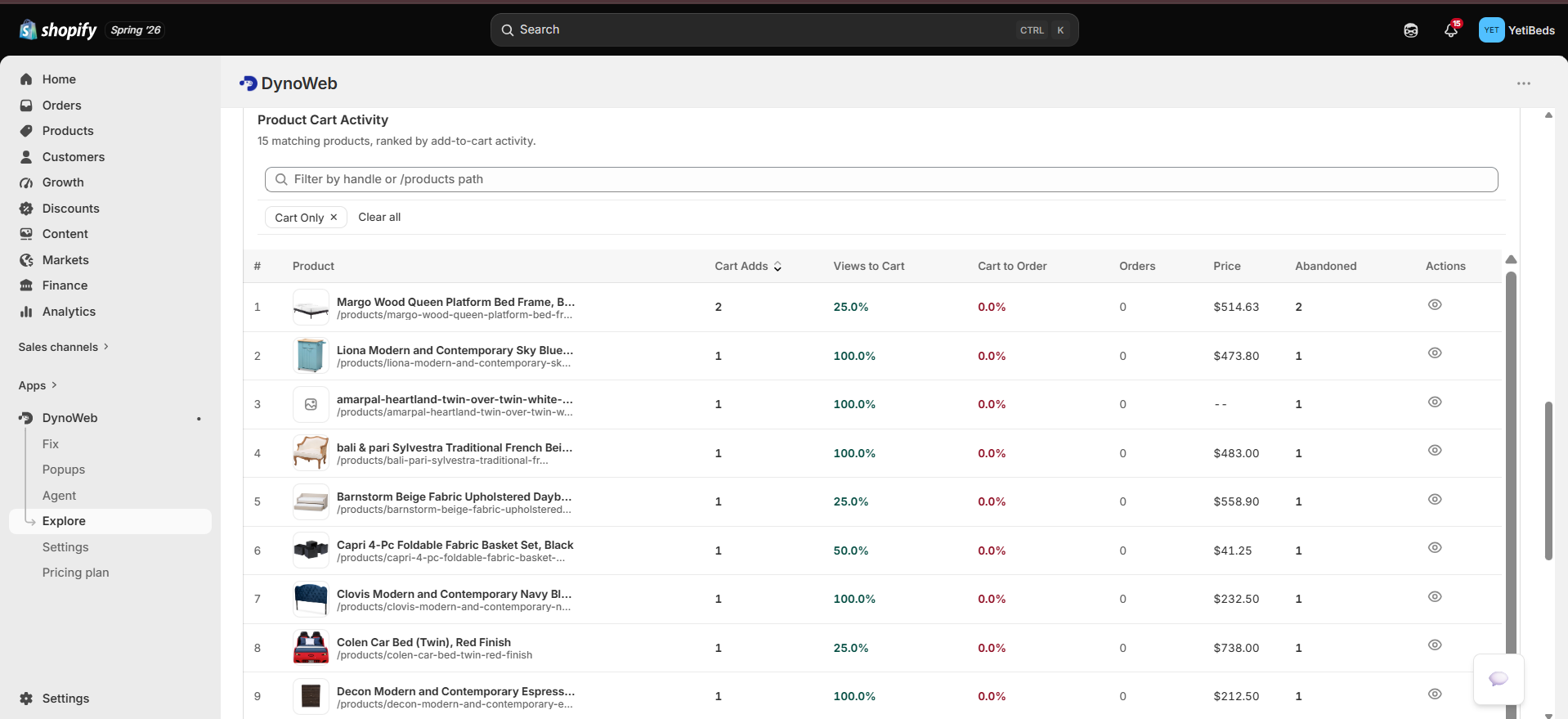
What it shows
Abandonment rate
Sessions that added at least one item and did not complete an order, as a share of sessions that added anything. Trended over your selected range so you can see whether it moved after a change, and comparable to the ~70% industry baseline.
Top abandoned products
Products ranked by cart-adds that did not convert. This is the highest-signal table on the page, because a product with high demand and low completion is a product where the product page did its job and something after it did not.
A concrete shape this takes: 89 cart-adds, 12 purchases. That product does not have a demand problem or a copy problem. Combined with a replay of the checkout flow, it usually turns out to be a shipping cost that appears late, a payment method that is missing, or a forced account creation.
Cart value trends
Average cart value over time. Worth watching next to abandonment, because a rising AOV with rising abandonment often means a free-shipping threshold is sitting just above where most carts land — shoppers add to reach it, then think better of it.
Product-level insights
Per product, the path from added to cart through purchased, so you can separate two different failures that look identical in aggregate:
- Products that are rarely added — a product page problem
- Products that are added constantly and rarely bought — a checkout problem
Abandonment patterns
Where in the flow sessions stop. Shipping step, payment step, account creation. This is the pointer that tells you which of the fixes above is the one worth doing.
Reading it
Start at the rate, not the products
If your overall abandonment is near the baseline, your problem is probably product-specific. If it is well above, something structural in the checkout is losing everyone and the per-product table is a distraction.
Find the step
The abandonment pattern breakdown narrows it to one stage. Do this before you touch product pages.
Watch three sessions that died there
Session replay, filtered to the pages involved. Three is usually enough to see the same hesitation twice, which is the point at which it stops being an anecdote.
Fix it, or intervene at the moment
Some cart problems are content fixes. Others are better solved by Popups — a free-shipping progress nudge on a cart that is $15 short, or an exit-intent rescue on a shopper who is leaving with items in the cart. Nudges also carry their own attribution, so the intervention reports its own revenue.
Limits
- Cart Overview sees your storefront, not Shopify's hosted checkout internals. DynoWeb's tracker runs on your theme. Steps inside Shopify's own checkout are inferred from what the tracker can observe plus order webhooks, not instrumented field by field. Treat the step attribution as a strong pointer, not a forensic timestamp.
- Multi-device journeys look like abandonment. A shopper who fills a cart on a phone and buys on a laptop is recorded as one abandoned session and one purchase. This inflates abandonment on mobile-heavy stores, consistently, in both directions of any comparison — so trends stay meaningful even where the absolute number is pessimistic.
- Low-volume products are noise. Eleven adds and two purchases is not an 82% abandonment rate, it is nine people. Sort by volume before you sort by rate.
- Abandonment is not always a defect. Carts are used as wishlists. A stable, unremarkable abandonment rate on a considered-purchase store is normal; the thing to chase is a change, or a single product far off your own baseline.
Related
Popups
Intervene on the abandoning session while it is still on the page.
Revenue Attribution
Which elements on the path to checkout actually carry orders.
Session Replay
Watch the abandonment happen instead of theorising about it.
Common questions
Can I see carts in real time?
Yes — open carts appear live with their current value and stage, which is useful for spotting a breakage the moment it starts rather than in tomorrow's report.
Does this include Shopify checkout?
Checkout runs on Shopify's domain with limited third-party access, so DynoWeb reports checkout progression from Shopify's own events. Everything up to the hand-off is captured in full detail.
How does this differ from an abandoned cart email app?
Those recover carts after the fact. This is about the carts not abandoning in the first place — finding the structural reason and removing it. The two are complementary.
Can I see the session behind a stalled cart?
Yes. Any cart links straight to its session replay, so you can watch the stall rather than infer it.
Session Replay
Reconstructed visitor sessions with frustration markers on the timeline, so you can jump to the moment something went wrong instead of watching from the top.
Storefront Speed
Core Web Vitals measured from your real sessions, then root-caused per page to the specific image, script or third party responsible.