

SEO Autopilot
Scans your whole Online Store for empty or weak SEO fields, writes them, and applies through the Admin API — never theme files, always reversible, verified by read-back.
Most Shopify stores have a large, boring, entirely fixable SEO problem: hundreds of resources with no meta description, a title that is just the product name, and images with no alt text. Each individual fix takes ninety seconds. Four hundred of them takes a week nobody has.
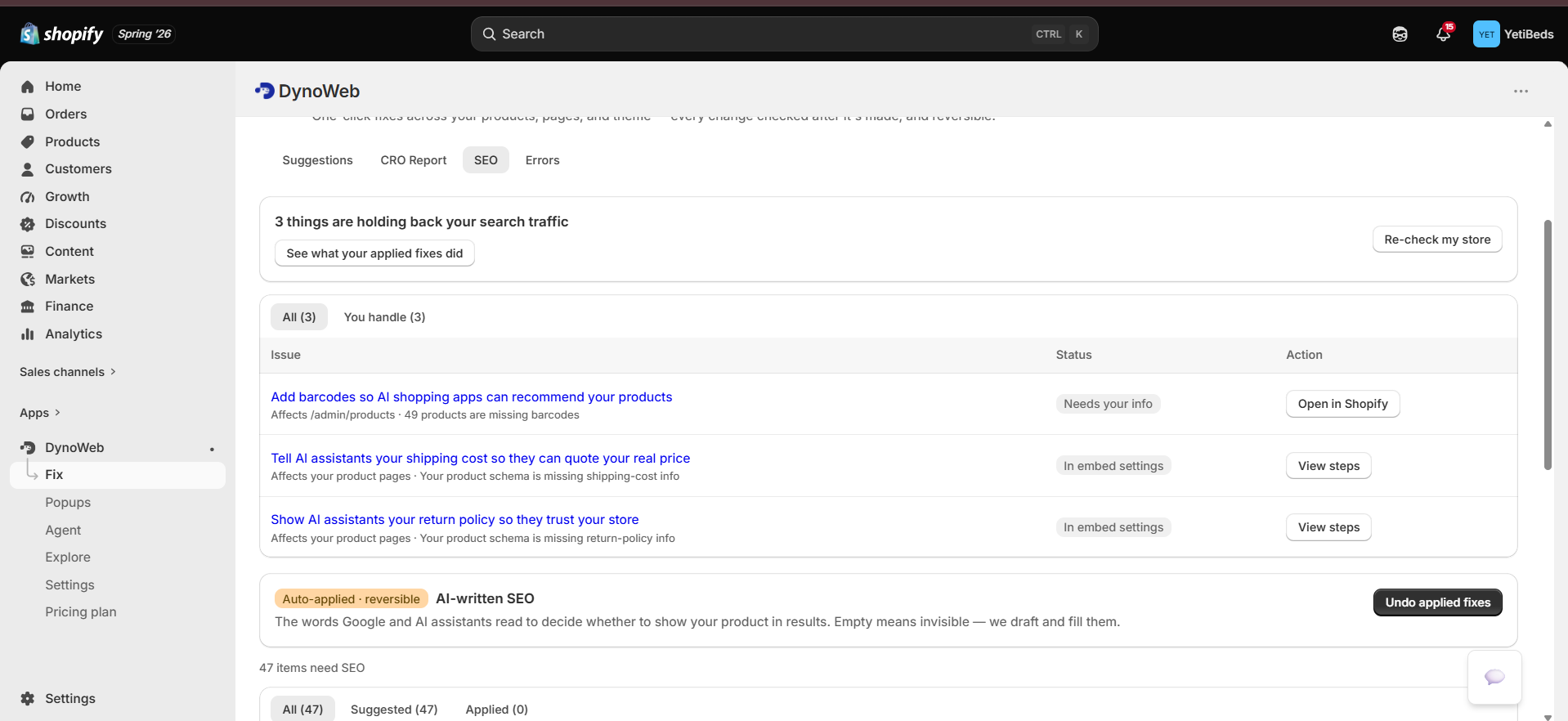
SEO Autopilot does that pass. It scans every Online Store resource, drafts the missing fields, shows you the batch, and applies the ones you approve — through Shopify's Admin API, reversibly, and without touching a single theme file.
What it fills
Three field types, bounded by the limits that actually matter — Google's display truncation, not Shopify's storage caps:
| Field | Limit | Why that limit |
|---|---|---|
| SEO title | 60 characters | Beyond this Google truncates in the SERP, so the tail is written for nobody |
| Meta description | 160 characters | Same reason |
| Image alt text | 125 characters | Screen-reader convention; also what image search reads |
A field only qualifies if it is empty or measurably weak. Autopilot does not rewrite a description you clearly wrote yourself.
Draft generation uses your catalogue context — product type, vendor, existing description — with keyword data from a search-volume provider, so titles are grounded in terms people actually search rather than paraphrases of the product name. Everything is written in your store's voice via Brand DNA.
Four resource types, four write mechanisms
This is the part that makes the feature real rather than a demo. Shopify does not store SEO uniformly, and each resource type needs its own verified mutation:
| Resource | How the SEO fields are written |
|---|---|
| Product | productUpdate for the native seo object; fileUpdate for image alt |
| Collection | collectionUpdate for seo and image.altText |
| Page | metafieldsSet — pages have no native seo field; Shopify keeps their search listing in the global.title_tag and global.description_tag metafields |
| Article | metafieldsSet for the same two metafields, plus articleUpdate for image alt |
Pages and articles are the ones other tools miss
Because there is no seo field on a page or an article, a tool that assumes one
silently does nothing for your entire content library. The metafield path is the
correct mechanism and it is what Autopilot uses.
Never theme files
This constraint is the whole safety model
SEO Autopilot writes only through per-resource Admin API mutations. It does not use the Asset API and does not edit Liquid, JSON templates or theme settings.
The reason is blunt: a bad theme write can blank a storefront. A bad productUpdate
sets a wrong meta description on one product, which is a typo, not an outage. Every
write is scoped to one field on one resource and the previous value is returned so
the UI can offer one-click undo.
Theme-level SEO — JSON-LD, Open Graph tags — ships through the app-embed block instead, which is Shopify's supported mechanism for exactly this and carries the same containment.
Verification by read-back
An apply is not marked done because the mutation returned without an error. Autopilot reads the field back from Shopify and records the outcome. "Verified" means it went and looked.
This is a small thing that matters more than it sounds. Shopify mutations can succeed at the API layer and still not produce the state you expected — validation coercion, a conflicting app, a field that silently ignores input. Read-back is the difference between "we sent it" and "it is there".
Undo
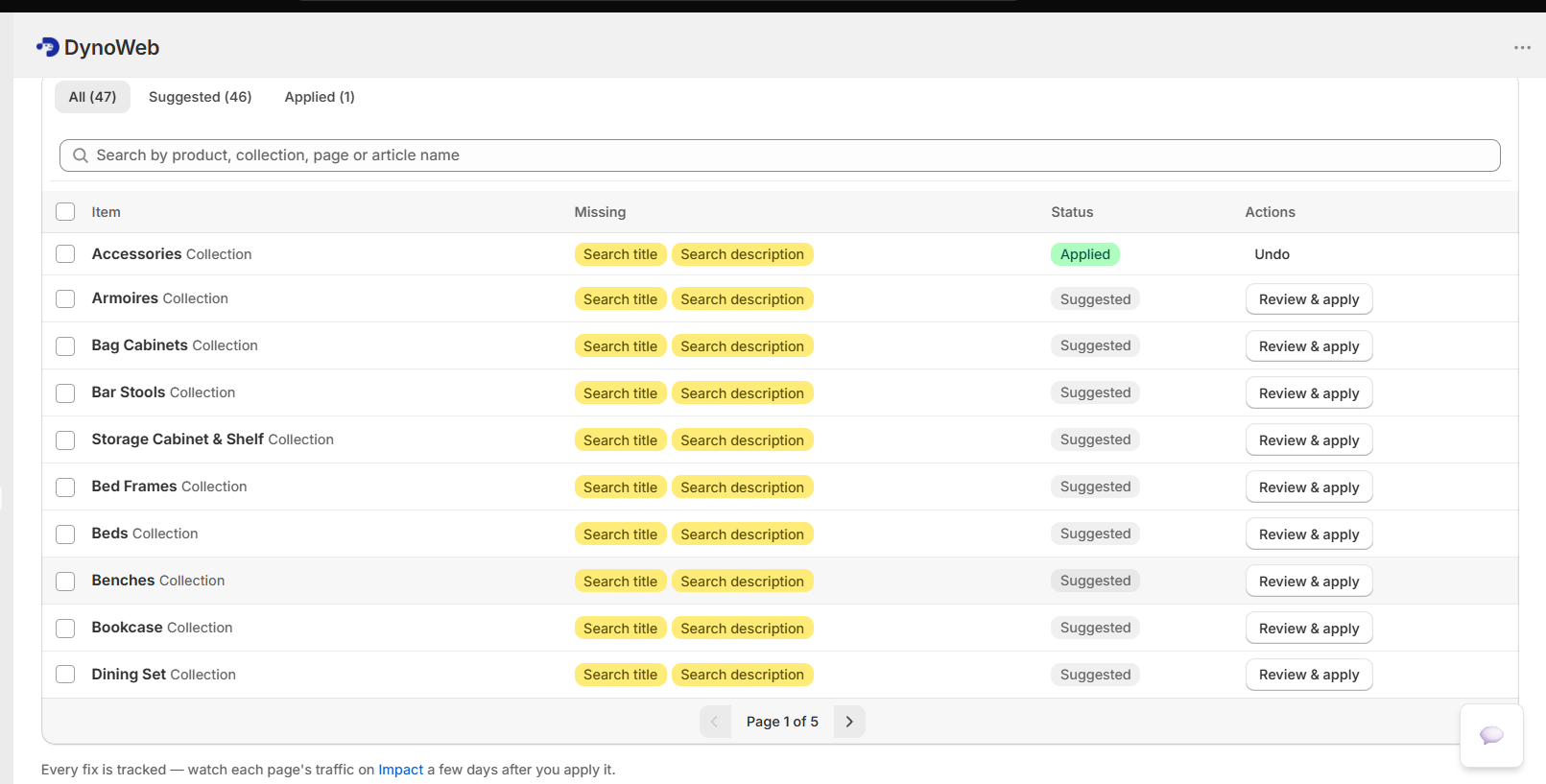
Every applied fix stores its previous value, so undo restores exactly what was there before — including restoring a field to empty if it was empty. Undo is per fix, not per batch, so a run where nine of ten were right does not have to be thrown away whole.
Running it
Scan
Autopilot enumerates products, collections, pages and articles and identifies which fields qualify. You see the scale of the problem before anything is generated.
Generate
Drafts for the qualifying fields, cached so re-opening the review screen does not re-spend model budget on the same rows.
Review
A table of current versus proposed, per resource, per field. Approve the batch, or deselect the rows you disagree with. Nothing is written before this step.
Apply, then verify
Writes go out per resource, then are read back. Applied fixes register with Impact, which measures the result on organic sessions to the pages involved.
Autopilot is reachable from an SEO or GEO suggestion detail page as well as directly, so you can fix a finding in the same place you read it.
Limits
- Product image alt auto-fix is off by default. It is the one capability that needs Shopify's file read/write scopes, and adding scopes forces every merchant to re-consent. It stays behind a flag until that is worth doing. Collection and article image alt use already-granted scopes and are unaffected.
- SEO fields are necessary, not sufficient. Filling four hundred empty meta descriptions removes a real handicap. It does not outrank a competitor with better content and more links. Treat this as hygiene you should not have to do by hand.
- Results take weeks, and are not isolated. Search rankings move on Google's schedule, and organic sessions are affected by seasonality and everything else you ship. Impact's measurement for SEO fixes is a difference-in-differences against your own store trend, which controls for store-wide movement — but not for an algorithm update.
- Generated titles are drafts with a character budget. The 60-character ceiling is a real constraint and occasionally forces a phrasing you would not have chosen. Review before approving; that is what the review step is for.
- Undo restores DynoWeb's recorded prior value. If something else changed the field after the apply, undo returns it to what was there before DynoWeb's write.
Related
AI Suggestions
Where SEO findings surface, with the SEO safety badge that flags conversion fixes with ranking risk.
Impact
Measures applied SEO fixes on organic sessions to the affected pages.
CRO Report
Where an SEO gap is sized against every other leak in the store.
Common questions
Will this break my existing rankings?
Nothing changes without your approval, and every applied change is reversible. Changes that carry ranking risk — URL handles in particular — are flagged as such rather than bundled in with safe metadata edits.
Does it handle redirects?
Broken internal links and orphaned URLs are surfaced, and redirect entries can be created through the Shopify API on approval.
Do I still need an SEO agency?
For strategy, content programmes and link acquisition, probably. For the recurring technical hygiene that eats agency hours at agency rates, this covers it.
How often does it re-crawl?
Regularly, and catalogue changes trigger re-checks on affected URLs so a new collection does not sit unaudited until the next scheduled pass.
Popups
Storefront interventions that fire on real behavioural signals — with a held-back control group, so the reported revenue is incremental rather than gross.
Impact
Every applied fix is measured on the KPI it was meant to move, as a difference-in-differences against your own store trend — with honest verdicts, including "no change".